

WhatsApp Marketing Automation That Replies For
A shared team inbox, an AI agent, visual automations and bulk campaigns — all running on Meta's official WhatsApp Business Cloud API. Connect your number in minutes and stop losing conversations in a phone nobody owns.
Official
Meta Tech Provider
5 min
To connect your number
24/7
AI replies while you sleep
Built on official infrastructure
Everything Your Team NeedsOn One WhatsApp Number
Six products that work as one. Every conversation, campaign and automation shares the same contacts, the same history and the same number.
Team Inbox
One shared inbox for your whole team. Assign chats, leave private notes, @mention a colleague, and see who is online — all on a single WhatsApp number.
Shared Team Inbox
Every agent, one number
Multi-Number & Country Routing
Run several WhatsApp numbers from one account, and wall each agent to the numbers — or the customer countries — they are allowed to handle.
Website Widget & Lead Forms
Drop a chat button on your site and capture orders through a WhatsApp-native form. Every lead lands in the same inbox as everything else.
REST API & Webhooks
Push orders, leads and events straight into WhatsApp from your store or CRM, and subscribe to webhooks when something happens on your side.
Sixteen Things You StopDoing By Hand
CodSender is not a bulk sender with an inbox bolted on. It is the whole operation — conversations, automation, growth and governance — on one WhatsApp number.
Converse
Every message in one placeShared Team Inbox
Assignment, private notes, @mentions, presence dots and per-agent unread counts.
Interactive Messages
Reply buttons, list menus, tappable link buttons and location requests — sent by an agent or the bot.
Rich Media
Images, video, documents and voice notes, sent and received with a proper player.
Widget & Lead Forms
A site chat button and a WhatsApp order form that both drop into the same inbox.
Automate
Work that happens without youAI Agent
Answers, qualifies and takes orders in Arabic, French or English, then hands over cleanly.
Visual Flow Builder
Triggers, branching conditions, wait steps and actions on a drag-and-drop canvas.
Quick Replies
Type / in the composer to drop in a saved answer. Shared across the whole team.
Smart Routing
Route by keyword, country or availability, and auto-assign to the right agent.
Grow
Turn conversations into revenueBulk Campaigns
Segment, schedule and personalise a template broadcast, with live delivery counters.
Template Manager
Build, submit and track WhatsApp templates through Meta approval, buttons included.
Contacts & Segments
Import, tag, add custom fields and build the segment you actually want to reach.
Analytics & Reports
Delivery, reads, replies, agent response time and a running cost estimate.
Operate
Scale without losing controlMulti-Number
Several WhatsApp numbers under one account, each with its own team and templates.
Country Scoping
Wall an agent to specific numbers or specific customer countries. Enforced server-side.
Roles & Permissions
Granular per-feature permissions so agents see exactly what they should.
API & Webhooks
REST endpoints and outbound webhooks to wire CodSender into your existing stack.
Connects to what you already run
Native integrations, a REST API and webhooks — so orders, leads and events reach WhatsApp without anyone copying a phone number.
See all integrationsGet Started inUnder 5 Minutes
Connect the number your customers already message, bring your contacts across, and send. Most accounts are live the same afternoon.
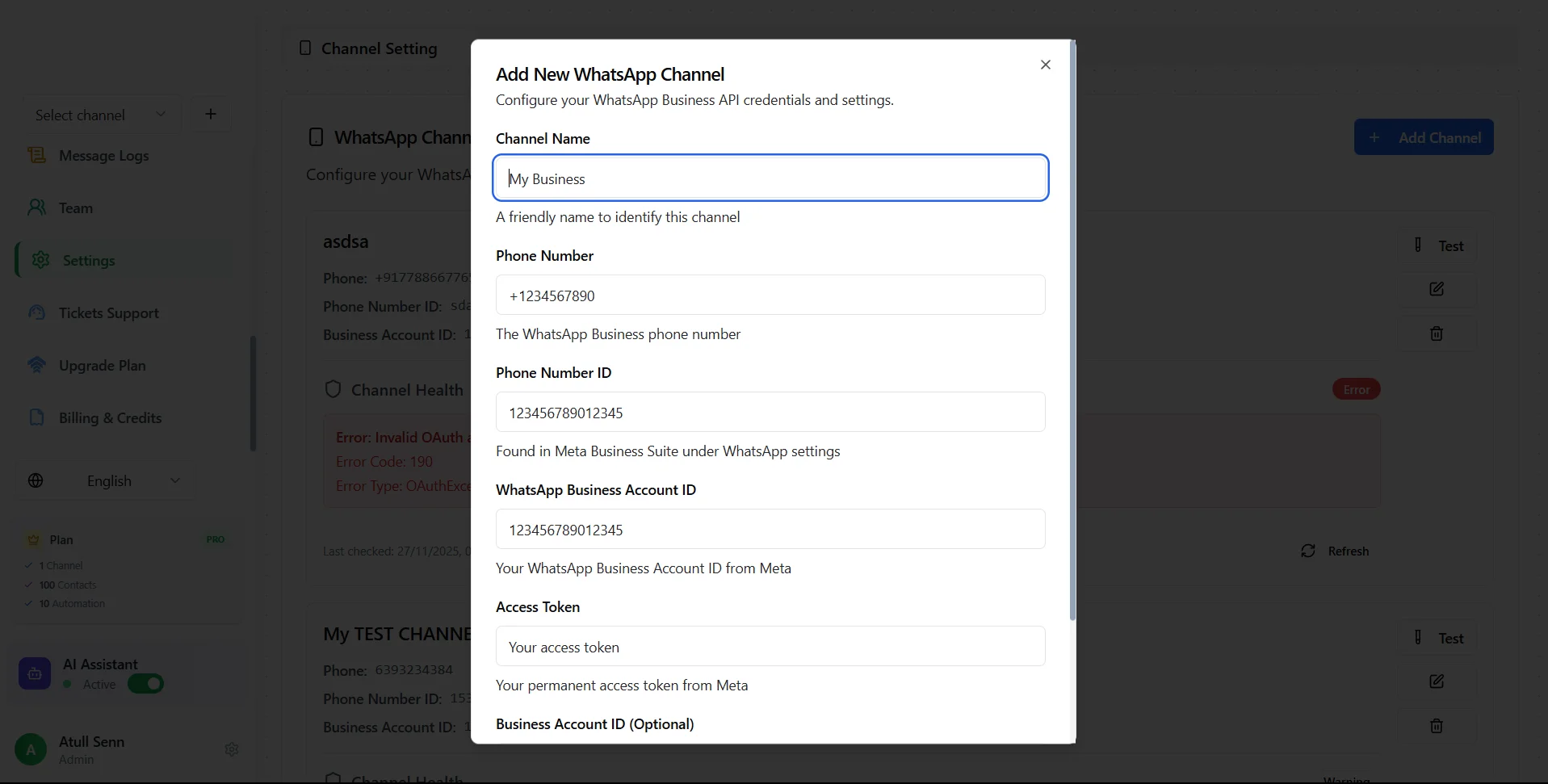
Connect Your Meta API
Bring your own WhatsApp Business API from Meta and connect it to our platform in seconds
Ready to Get Started?
Connect your number, import your contacts and send your first campaign today — free, no card required.
Start Your Free TrialBuilt for Businesses That Lose Leads in WhatsApp
CodSender helps teams follow up after first contact, recover missed conversations, and keep customer communication organized without risky blasting.
E-commerce Follow-up
Recover buyers who ask about products, pricing, or delivery, then disappear before checkout.
Recovered conversations
Workflow Focus
Real WhatsApp Problem
Built around actual sales and support bottlenecks
Customers ask about a product on WhatsApp, then disappear. Manual follow-up is slow, and aggressive bulk re-contact can damage quality or trigger restrictions.
CodSender workflow
Recovered abandoned conversations without risky blasting.
Operational Impact
The Difference BetweenGrowing and Getting Banned
Most “WhatsApp marketing” tools drive an unofficial library or a phone farm. It works until Meta notices — then the number, the history and the customers are gone.
| What you get | CodSender | Unofficial / QR tools | WhatsApp Business app |
|---|---|---|---|
| Runs on Meta's official Cloud APIUnofficial tools reverse-engineer the protocol. Meta bans on detection. | Included | Not available | Limited |
| Risk of losing your number | Low — sanctioned access | High — ban on detection | Medium — blocked for bulk |
| Whole team on one number | Unlimited agents | Limited | Up to 5 linked devices |
| Verified green business profile | Included | Not available | Limited |
| Bulk campaigns without throttling | Included | Limited | Not available |
| AI agent that answers autonomously | Included | Limited | Not available |
| Visual automation builder | Included | Limited | Away message only |
| Keep using the app on your phoneCoexistence: your phone keeps working while the API runs alongside it. | Included | Not available | Included |
| Campaign and agent analytics | Included | Limited | Not available |
| Survives a WhatsApp update | Included | Not available | Included |
Runs on Meta's official Cloud API
Unofficial tools reverse-engineer the protocol. Meta bans on detection.
- CodSender
- Included
- Unofficial / QR tools
- Not available
- WhatsApp Business app
- Limited
Risk of losing your number
- CodSender
- Low — sanctioned access
- Unofficial / QR tools
- High — ban on detection
- WhatsApp Business app
- Medium — blocked for bulk
Whole team on one number
- CodSender
- Unlimited agents
- Unofficial / QR tools
- Limited
- WhatsApp Business app
- Up to 5 linked devices
Verified green business profile
- CodSender
- Included
- Unofficial / QR tools
- Not available
- WhatsApp Business app
- Limited
Bulk campaigns without throttling
- CodSender
- Included
- Unofficial / QR tools
- Limited
- WhatsApp Business app
- Not available
AI agent that answers autonomously
- CodSender
- Included
- Unofficial / QR tools
- Limited
- WhatsApp Business app
- Not available
Visual automation builder
- CodSender
- Included
- Unofficial / QR tools
- Limited
- WhatsApp Business app
- Away message only
Keep using the app on your phone
Coexistence: your phone keeps working while the API runs alongside it.
- CodSender
- Included
- Unofficial / QR tools
- Not available
- WhatsApp Business app
- Included
Campaign and agent analytics
- CodSender
- Included
- Unofficial / QR tools
- Limited
- WhatsApp Business app
- Not available
Survives a WhatsApp update
- CodSender
- Included
- Unofficial / QR tools
- Not available
- WhatsApp Business app
- Included
Coexistence lets you connect a number that is already running in the WhatsApp Business app — you keep chatting from your phone while your team works the same conversations from CodSender.
Enterprise Automation,Without the Enterprise Price Tag
CodSender is an official Meta Tech Provider. That is not a badge on a footer — it is the reason your number stays safe while you send at scale.

“We built CodSender to give every business access to enterprise-grade marketing automation. As an official Meta Tech Provider, we ensure you get the most reliable, compliant, and powerful platform on the market.”
CodSender Team
Founder & CEO at CodSender
Official Meta Tech Provider
Learn, Build & Grow Faster
Expert guides, proven strategies, and real success stories to help you master WhatsApp marketing
The Complete WhatsApp Business API Guide 2026
Everything you need to know about setting up, configuring, and scaling your WhatsApp Business API integration.
10 Strategies to Boost WhatsApp Campaign ROI
Proven tactics from top-performing businesses to increase open rates, engagement, and conversions on WhatsApp.
WhatsApp Automation Playbooks for E-commerce
How online stores use WhatsApp for abandoned carts, order updates and post-delivery follow-up — flow by flow.
Questions People AskBefore They Switch
The WhatsApp Business API has a lot of folklore around it. Here is what is actually true.
Will my number get banned for sending bulk messages?
Not on the official API, which is what CodSender uses. Bans happen when a tool drives WhatsApp through an unofficial library or a QR-linked phone — Meta detects it and removes the number. With the Cloud API you send approved templates through sanctioned infrastructure, and your quality rating is visible to you at all times. Send relevant messages to people who opted in and your number stays healthy.
Do I need the WhatsApp Business API, or is the free app enough?
The free WhatsApp Business app is fine for one person answering a handful of chats. You need the API once you have a team sharing one number, want to send campaigns to a list, need automations or an AI agent, or want analytics. The app caps you at five linked devices, blocks bulk sending, and gives you no reporting.
Can I keep using WhatsApp on my phone after connecting?
Yes. CodSender supports Coexistence, so a number already running in the WhatsApp Business app can be connected to the API without losing anything. You keep chatting from your phone, your chat history syncs across, and your team works the same conversations from the shared inbox.
Do I need a brand-new phone number?
No. You can bring the number your customers already message. If it is currently on the WhatsApp Business app we connect it through Coexistence; if it is unused we register it directly. A number can only be attached to one API provider at a time, so it has to be released from any previous tool first.
How much does WhatsApp actually cost per message?
Meta bills you directly, not us, and the rate depends on the destination country and the conversation category — marketing, utility, authentication or service. Service conversations started by the customer are free within the 24-hour window. CodSender shows a running cost estimate before you send a campaign so there are no surprises on the Meta invoice.
What is the 24-hour customer service window?
When a customer messages you, a 24-hour window opens in which you can reply with any free-form message. After it closes you can only re-open the conversation with a template that Meta pre-approved. CodSender tracks the window on every conversation and tells the agent when a template is required, so nothing gets silently rejected.
How long does setup take?
Around five minutes. You sign in with Meta through the embedded signup flow, pick the WhatsApp number and business account, and CodSender handles the registration and webhook subscription. Importing contacts and getting your first template approved usually takes longer than the connection itself.
Can my whole team work from a single number?
That is the point of the shared inbox. Every agent gets their own login, their own unread counts and their own assignment queue, while customers only ever see one business number. You can add private notes, @mention a colleague, and see who is online before you hand a chat over.
Does CodSender work in Arabic and French?
The whole interface ships in English, French and Arabic, with proper right-to-left layout and Arabic typography — not a machine-translated overlay. The AI agent replies in whichever language your customer writes in.
Is CodSender an official Meta partner?
Yes. CodSender is a registered Meta Tech Provider, which is what allows us to onboard your WhatsApp Business Account through embedded signup and send on your behalf through the Cloud API. It also means we are held to Meta's platform policies — which is exactly what you want from the company handling your customer conversations.
Your Customers Are Already on WhatsApp
Connect your number, import your contacts and send your first campaign today. Free to start, no credit card, no setup fee.
Connect in Minutes
Sign in with Meta and pick your number
Official & Compliant
Meta Cloud API, encrypted tokens
Real Human Support
We answer on WhatsApp, obviously
Free to Start
No card, no setup fee, cancel anytime